
Vacation rental property pages are usually not indexed because Google cannot find a clear crawl path to unique, substantive HTML—or it finds the URL and decides the page is too thin, duplicated, or technically blocked to deserve an index entry.
Start with the indexing status, not the ranking report
Open Google Search Console URL Inspection for a representative property page. Confirm:
- Whether the URL is on Google
- The referring sitemap or crawl source
- Any robots, noindex, or canonical that points elsewhere
- Whether the crawled HTML includes property name, location, amenities, and unique description text
If the page is “Discovered – currently not indexed” or “Crawled – currently not indexed,” treat that as a quality or crawl-budget signal—not a temporary glitch to ignore.
Common failure patterns on vacation rental sites
Duplicate channel copy
Many operators paste the same Airbnb or Vrbo description onto every direct site property page. When Google already indexes that language on OTAs, the direct page often looks like a weaker duplicate.
Sitemap gaps after PMS sync
Property URLs created in OwnerRez, Guesty, Hostaway, or Lodgify never get added to the website sitemap, or the sitemap lists staging domains and soft-404 templates.
Canonical mistakes
Listing pages that canonicalize to a category hub, homepage, or PMS subdomain tell Google not to index the property URL you care about.
Widget-first pages
If the visible “content” is mostly a third-party booking iframe with almost no unique HTML around it, crawlers may see a shell page. Guests may still book; search engines may not keep the URL.
Parameter and filter URLs
Faceted search, share tokens, and calendar query strings can create thousands of near-duplicate URLs that dilute crawl attention away from clean property permalinks.
Field notes from Coastal Link Properties
When we rebuilt Coastal Link Properties on Astro + Cloudflare with OwnerRez sync, the indexing goal was explicit: every property permalink had to be a real HTML page Google could crawl without executing a booking widget first.
What we shipped for that stack:
- Unique property titles, H1s, and body copy in the static HTML (not injected only after JS)
- Self-referencing canonicals on production
wwwhostnames - XML sitemap entries for indexable property URLs as they sync
- Fast delivery so LCP stays in a usable range for rendering and ranking signals
We keep a lab PageSpeed snapshot from that build as a technical proof point of the delivery layer—not as a ranking guarantee:
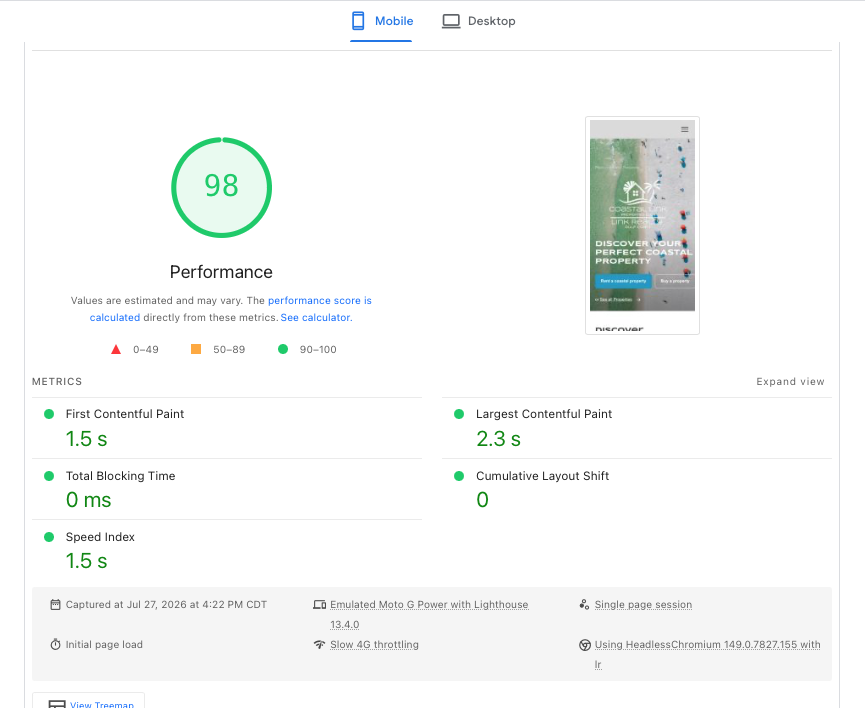
Speed alone does not force indexing. Combined with unique crawlable copy, correct canonicals, and sitemap coverage, it removes the usual excuses Google has for dropping thin property shells.
A practical diagnostic sequence
- Fetch the page with JavaScript disabled (or view crawled HTML in Search Console). Confirm unique property copy is present without relying on the widget alone.
- Check
robots.txtand page-level robots meta for accidental blocks. - Verify the canonical host matches the production
wwwor apex you submit in Search Console. - Confirm the XML sitemap lists the property permalink and returns HTTP 200.
- Compare titles and H1s across properties—templated “Book your stay” titles across 40 cabins look identical to a crawler.
- Reduce duplicate paragraphs shared with OTA listings; keep facts consistent, rewrite the narrative for the direct site.
What “fixed” looks like
An indexable property page typically has:
- A unique title and H1 naming the property and destination
- Distinct body copy that is not a full OTA paste
- Working internal links from destination and listing hubs
- A self-referencing canonical
- Inclusion in an XML sitemap
- Fast enough LCP that Google can usefully render the page
If your property pages are discovered but not indexed, start with that checklist before buying more content or links.